Artwork Guidelines
Different printing presses can require different types of art files to print from. We will let you know exactly what we need to properly print your labels and decals.
Requirements and Preferences
Once we've sent you a quote you can be sure that we have narrowed down which printing press to utilize for your project. The most commonly used press these days are digital presses; they're cost-effective, fast, and can print from a wide variety of art files. There are, however, some print methods that are a bit pickier than their digital brethren. It really boils down to what you want your final product to look like.
If you are quoted for anything with embossing, foiling, screen printing, or need colour matching, then vector files are a requirement. If you simply need an image printed, then raster files are suitable.
Know your File Formats
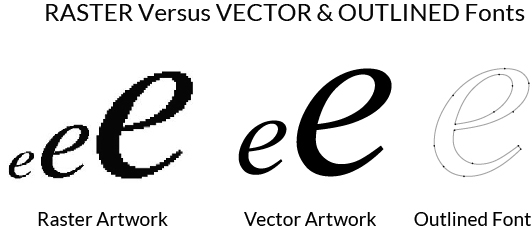
Vector files are line art, scalable to any size without losing resolution - the image will remain clean and crisp. Vector files are always the preferred file for printing; those filetypes consist of:
- EPS (Encapsulated Post Script)
- AI (Adobe Illustrator)
- PDF (Adobe PDF)
Raster files are pixel-based images that change resolution depending on what size they are scaled to. It is important to supply these files at 100% scale, at least 300 PPI, and in a CMYK colour profile. Filetypes consist of:
- PSD (Adobe Photoshop)
- JPG (High Resolution JPEG)
- BMP (Bitmap)
Vectorizing Images
If you are not able to provide us with a high quality image, we provide a vectorizing/recreating service. Most logos or images can be recreated for $35; however, images with more detail are subject to quoting prior to vectorizing the image.
Please contact a Customer Service Representative for more details.
We will be happy to give you a copy of the vector file once it is complete.
File Preparation Tips
- Include a bleed, if needed, of at least 0.0625" on the outside of the cut line, on all sides.
- There is a 0.0625" margin on the inside of the cut line that should be considered a "safe zone" where no important text or graphics should be printed. This is to account for any registrations shifts.
- Supply your digital artwork at 100% of the size required for printing.
- Convert all text to outlines, or supply us with the text font (a TTF or OTF file).
- Raster files should be minimum of 300ppi.
Colour Output
Digitally printed labels and decals are printed in CMYK. Sometimes files are submitted in the RGB colour format, which is great for computer screens, but not so great for printing. It has the potential of drastically changing the colour output, which can be really disappointing.
When it comes to colour matching, a specific (solid coated) Pantone colour value is necessary. The Pantone Matching System is a universal library of colours that all us printers use to know that we are all talking about the same thing. It is best to let us know about any colour matching needs when first requesting your quote, as it could affect your pricing.
If you have questions about your artwork file, or you'd like us to check the quality before you place your order, please submit our EZ Quote form and attach the artwork.